How to Build a Business Case for Implementing Lorikeet
Tech
Implementing Lorikeet for customer support is not about adding a shiny AI widget to your help centre. A strong business case needs to show, with numbers, how slow and manual response workflows are already creating avoidable costs and how a proposed solution would reduce handle time, improve response quality, and deliver a clear, measurable ROI.
Here’s the exact framework to make your case clear cut. You can use this as a guide to write it yourself, or you can save a heap of time by asking Riff to turn this into a polished business case, tailored to your company.
Lorikeet has a helpful ROI calculator, this business case template helps when you need more to get the green light.
The Key Things to Cover

1. The Pain (Current State)
Approval gets easier when your manager can feel the inefficiency in support.
Typical “before Lorikeet” pains to highlight:
Slow responses and inconsistent quality
Replies vary wildly depending on who picks up the ticket
New agents take months to ramp to “confident”
Our requirements are complex and our current tool's AI solution doesn't deliver
Knowledge is trapped in people’s heads or scattered
Docs, past tickets, Slack threads, Confluence pages, and internal wikis all contain overlapping information
Agents waste time hunting for the “latest” answer
High handle times and context switching
Agents copy-paste from macros that don’t quite fit
They manually rewrite or localise answers every time
Customer experience is fragile
Tone can be off (too robotic, too casual, or too abrupt) and brand matters
Important policy details get missed, creating re-opens and escalations
Support leadership has low leverage
QA is manual and random
No consistent way to enforce brand voice, compliance, or updated policies
If you can quantify, even loosely, do it:
“Our average first response time is ~X minutes/hours, and we re-open Y% of tickets because the first answer wasn’t complete.”
“The current system only resolves X% of tickets.” (a graph can be helpful showing the different categories of tickets that the off the shelf agents are resolving at to what degree of success).
“New joiners take around X weeks before they can handle complex queries without heavy supervision.”
The clearer and more specific the pain, the faster approval moves.
2. Desired Outcomes
Tie Lorikeet directly to business objectives: faster responses, higher CSAT, lower cost per ticket, and more scalable support operations.
What implementing Lorikeet unlocks:
Faster, more consistent replies
Draft responses grounded in your own help centre, macros, and past tickets
Agents spend time reviewing answers, not writing from scratch
Single source of truth in practice, not just on paper
Updated policies and product guidance flow straight into suggestions
Less risk of someone using an outdated doc or workaround
Shorter onboarding ramp
New agents can lean on suggested answers while they learn
Team leads spend less time correcting the basics and more on edge cases
Higher quality and compliance
Consistent tone and structure in every reply
Easier to standardise legal and policy language
Operational leverage
Managers can focus on workflows, automation, and coaching
Fewer escalations and re-opens; better use of senior time
Always connect outcomes to company-level goals. For example:
“Implementing Lorikeet for customer support helps us reduce average handle time by an estimated 20–30%, improve CSAT, and scale ticket volume without linearly increasing headcount.”
3. Options Considered
Managers want to see that you’ve done your homework and are not just chasing AI hype on the last post you read.
Option A - Status Quo: Manual replies, macros, and scattered knowledge
Staying with our current setup keeps costs predictable in the short term but preserves structural inefficiencies:
Handle time remains high, with agents spending ~X minutes rewriting similar answers.
Quality and tone vary significantly, increasing re-open rates and customer confusion.
Onboarding remains slow: new FTEs need ~X weeks before handling complex tickets confidently.
Leadership spends time in reactive QA, rewriting answers after issues occur rather than preventing them.
As ticket volume grows, this model forces linear headcount growth, increasing support cost per ticket.
This option offers the lowest disruption but guarantees escalating costs and stagnant customer experience.
Option B: Use “Basic AI” inside our existing help desk
Most help desks now offer embedded AI, but these models are not tuned to our product, policies, or voice.
Limitations include:
Low accuracy for complex workflows; models hallucinate or miss policy nuance.
No control over tone or compliance language, making brand consistency difficult.
Difficult to enforce updates, agents may still rely on outdated macros or knowledge articles.
Limited debugging or accountability when AI outputs incorrect answers.
Minimal deflection benefit: these tools often require perfect knowledge bases to work well.
This option is [lower cost] but introduces compliance risk and does not solve onboarding, quality, or efficiency gaps. Note: It won't necessarily be lower cost, make sure you know your numbers.
Option C: Add More Headcount to Absorb Growth
Hiring more FTEs can maintain SLAs in the short term, but it is the highest-cost path.
Each new hire costs ~$X fully loaded annually.
Increased staffing requires more management, more QA, and more onboarding capacity.
Repetitive, low-value ticket types continue consuming senior time.
Does not address root causes (inconsistent knowledge, slow drafting, re-opens).
This option increases capacity but not efficiency and becomes unsustainable as volume grows.
Option D: Switch to an Alternative AI Vendor
We assessed solutions such as [Vendor A] and [Vendor B].
Key limitations commonly encountered:
Higher pricing models without guaranteed throughput reduction.
Generic AI tuned for broad use cases, not specifically for support workflows.
Weak guardrails, making it difficult to enforce brand voice or mandatory policy language.
Limited integration depth, leading to inconsistent drafts across ticketing channels.
Struggles with complexity: vendor models often cannot combine product details, policies, and historical tickets reliably.
These tools may appear feature-rich but become expensive or ineffective when applied to our real support environments.
Option E: Do Nothing Until Later (Delay AI Adoption for 6–12 Months)
Waiting reduces immediate spending but increases long-term operational and competitive risk:
Competitors continue improving resolution speed and support experience.
We forfeit X hours/month of potential time savings, equal to ~$Y annually.
Ticket volume increases without increasing efficiency, forcing future hiring.
Customer expectations for “fast, accurate, AI-assisted support” will rise; we risk falling behind.
This option is the least capital-intensive now but the most expensive over the next 12–24 months.
Lorikeet does provide some comparison figures on their website.
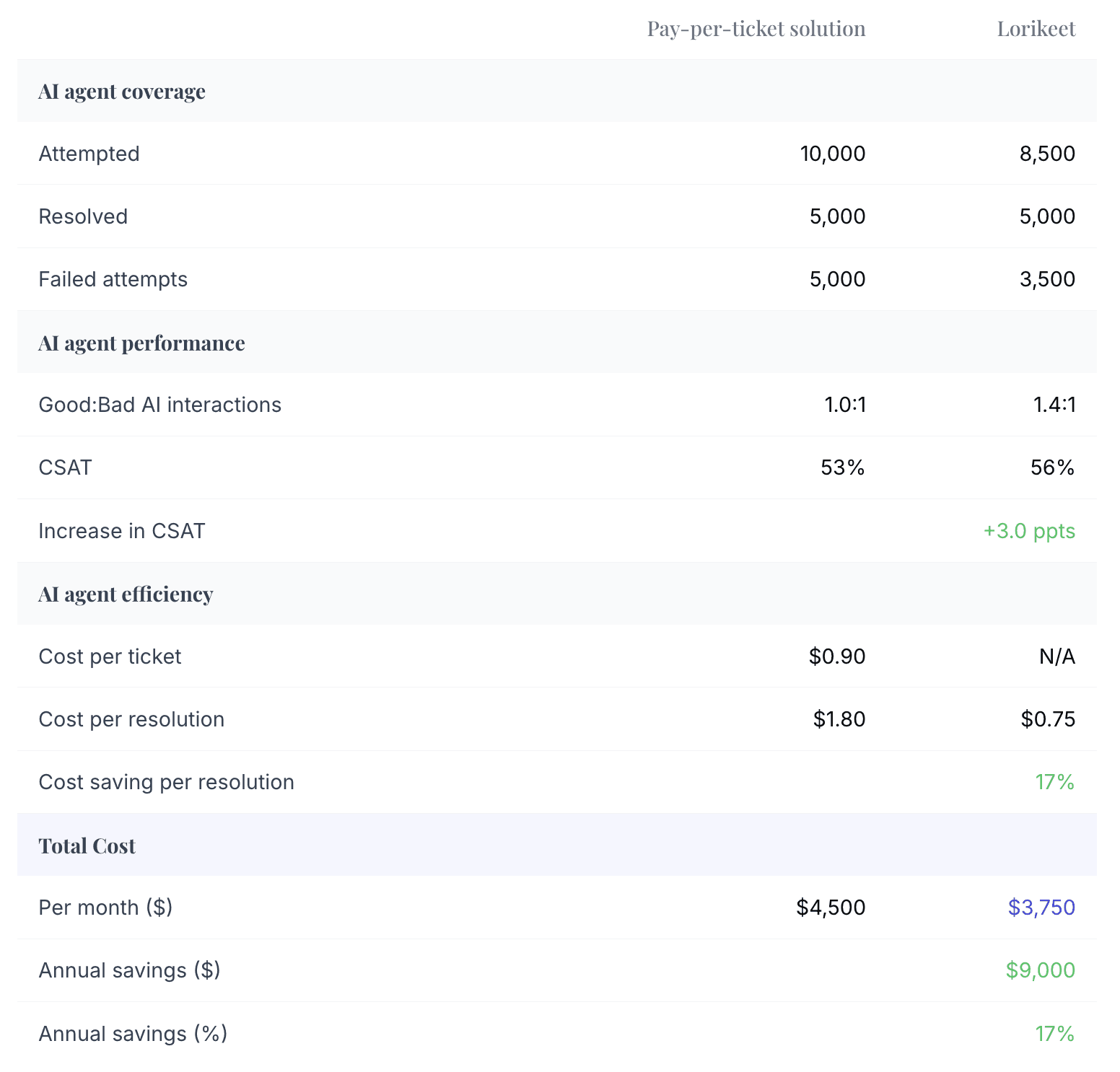
This shows a CFO-level evaluation: you’re not just buying “AI,” you’re investing in a lever to reduce cost per ticket and protect customer experience as volumes grow.
4. Cost and ROI
A strong business case doesn’t need perfect precision, it needs directionally clear value at least at the start.
Costs (Example Structure)
Platform / license cost
Lorikeet pricing model: $X per resolved ticket
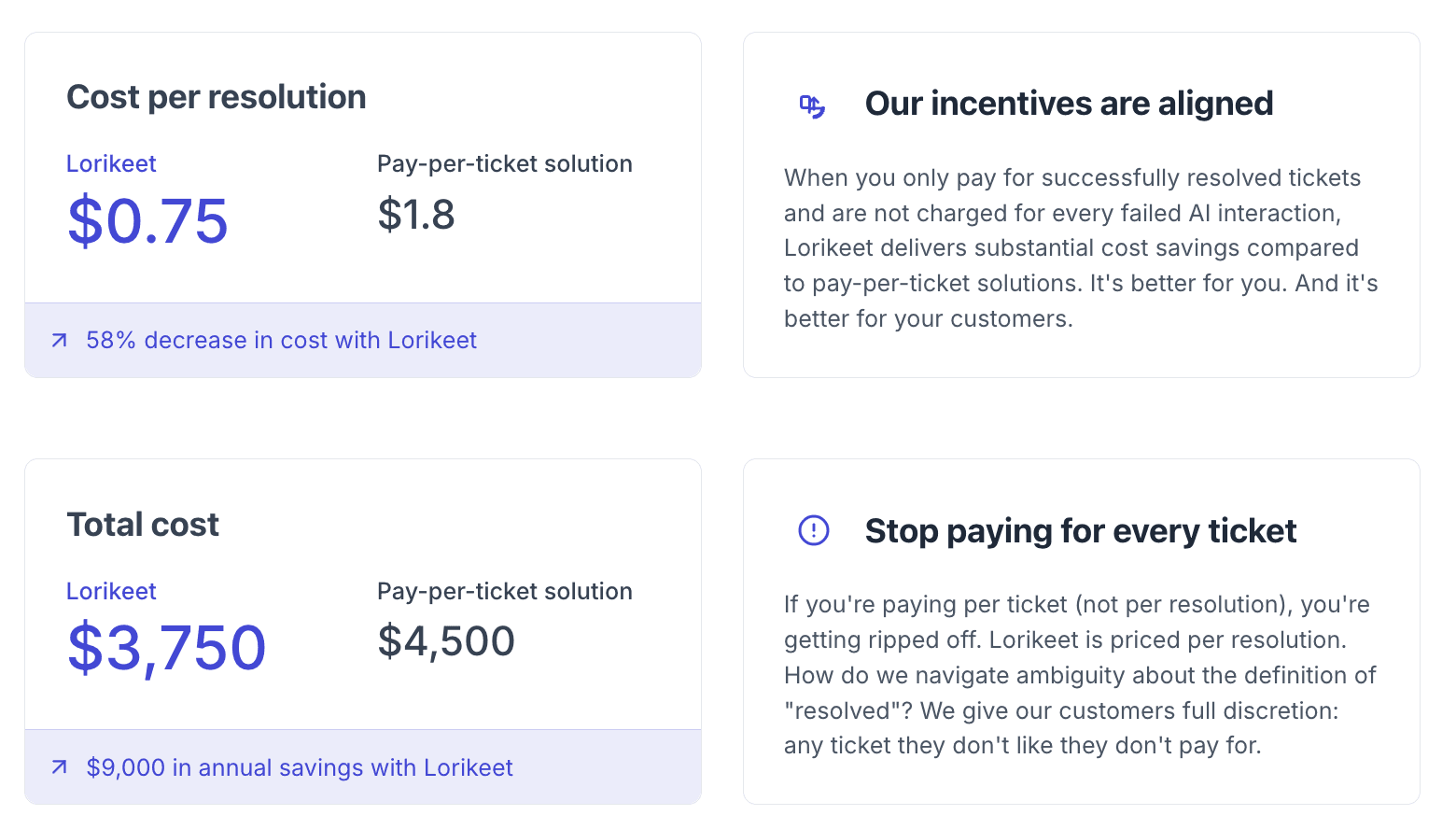
Implementation / enablement
Time to connect help desk and knowledge base
Time investment from support ops / leads to tune prompts, templates, and guardrails
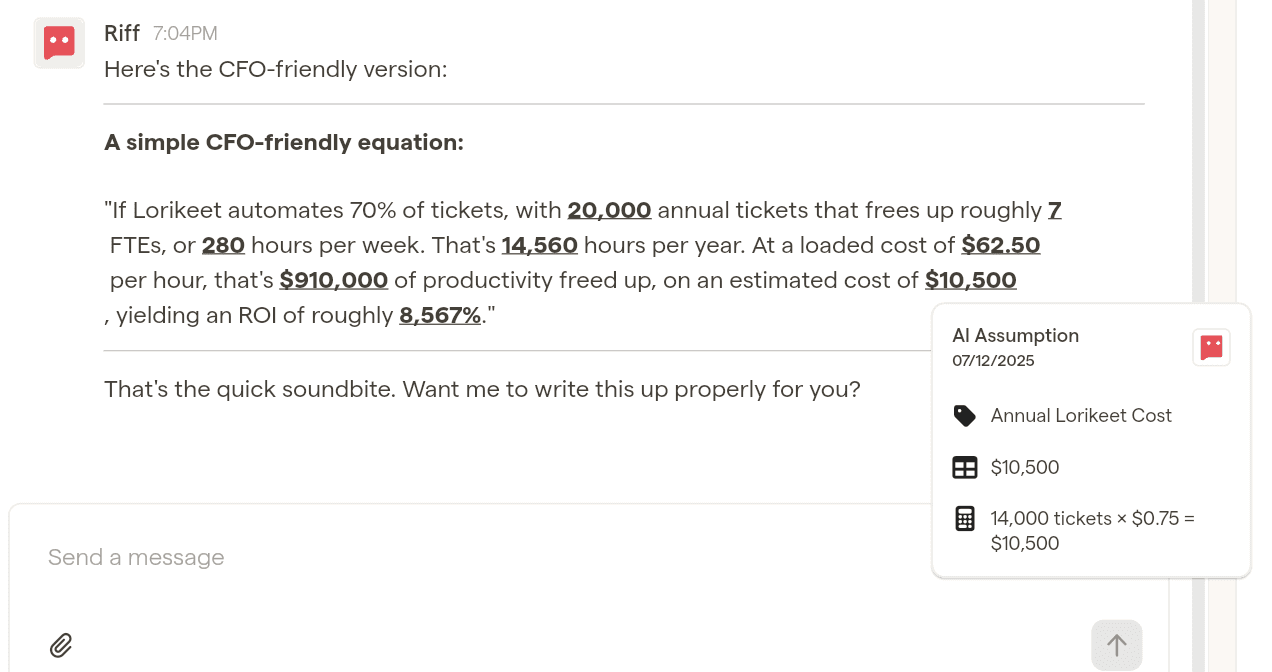
Total estimated annual cost
Approx. $X–$Y per year (include any overages, training, or initial configuration if material)
ROI Components
Break the benefits into buckets your manager will care about. This becomes far more compelling if you have 12 months of historical ticket volume and average handle-time (AHT) for the categories Lorikeet is solving.
Riff can help you calculate ROI using your real numbers too. The ROI will depend on how your team is set up, number of tickets not already being automated and so on.
Productivity (time saved per ticket)
If Lorikeet cuts average handle time by even 1–2 minutes on tickets where it’s used:
Example:
[30,000] tickets per year
1.5 minutes saved per ticket
30,000 × 1.5 = 45,000 minutes = 750 hours
At a fully loaded cost of [$40/hour], that’s ~$30,000 of time freed for higher-value work (again, state what that is, don't just say it, what else will those people do that adds more value)
Deflection and re-open reduction
Better, more complete answers mean fewer follow-ups:
If re-opens drop from 20% to 15% on 30,000 tickets:
5% × 30,000 = 1,500 fewer tickets
At ~5 minutes average handle time, that’s another 7,500 minutes (~125 hours) saved.
Headcount and hiring avoidance
If volume grows 20% but you can continue using Lorikeet v new hires, under a scenario of a 25% increase we save $X
Customer impact (harder to quantify but important)
Higher CSAT and NPS
Lower churn due to better support on critical issues
Stronger brand perception in your market
5. Implementation Path (Reducing Risk)
Show that rollout is simple, staged, and low risk.
Outline a plan, Lorikeet will be able to provide their recommendation on how to de-risk this as well.
Week 1–2 – Setup and integration
Connect Lorikeet to your help desk and knowledge base
Import key help articles, macros, and policy docs
Define your tone, brand guidelines, and guardrails
Week 3 – Pilot with a small group
3–5 agents across different tiers (e.g., general support + technical)
Measure:
Handle time on pilot vs non-pilot
Re-open rates
Agent satisfaction and perceived usefulness
Week 4 – Refine and expand
Iterate on prompts, templates, and content
Roll out to the broader team once initial kinks are solved
Month 2 – Optimise and report
Start tracking key metrics:
Average handle time (AHT)
CSAT and re-opens
First response time
Begin sharing monthly “AI-assisted support” reports with leadership
Month 3 – Scale and standardise
Embed Lorikeet usage guidelines into onboarding
Use learnings to improve your knowledge base and macros
Managers often care a lot that you have contained risk with a pilot, and that there’s a clear path from experiment → measurable impact → standard operating practice.
The One-Page Business Case Template
You can copy, paste, and customise this for your internal doc or approval form or better yet, just ask Riff to do it. You'll save time and get a better answer.
Request for Approval: Implementing Lorikeet for Customer Support
1. Problem / Current State
Our support team currently relies on manual replies, basic tools, and scattered knowledge sources (help centre, docs, Slack, Confluence). This results in:
Approximately X hours per week spent searching for information and rewriting similar replies
Inconsistent response quality and tone across agents
Higher re-open and escalation rates than desired
Longer onboarding times for new agents and heavy reliance on seniors for basic questions
As ticket volume grows, this model becomes increasingly inefficient and drives up cost per ticket, customer frustration, and burnout risk. We have an opportunity to leverage AI for cost savings and to add additional value to our customers.
2. Proposed Solution: Lorikeet for AI-Assisted Customer Support
Implementing Lorikeet will:
Standardise tone, structure, and policy compliance in responses
Reduce manual writing and searching, freeing CS to handle more tickets and more complex issues
Shorten onboarding time for new hires by giving them strong drafts to work from
Improve the overall customer experience through faster, clearer, more consistent answers
We expect this to reduce average handle time and re-open rates while maintaining or improving CSAT.
3. Options Considered
Status Quo
Maintain current process with manual replies and macros. This preserves existing inefficiencies and scales linearly with headcount.
Other Options
Hire additional support agents to meet growing ticket volume (higher ongoing cost, slower to implement).
Rely on generic AI tools not tailored to our support workflows (higher quality and compliance risk).
Recommended: Lorikeet
Built to augment support teams specifically, integrates with our help desk and knowledge base, provides controllable, brand-safe draft replies, and enables us to handle more tickets without proportionally increasing headcount.
4. Cost and ROI
Estimated annual cost: $X (licenses + any implementation effort) v [current cost if with current vendor]
Estimated time savings: X hours per month across the team from reduced writing and searching
Productivity value: Approximately $Y per month in freed capacity (based on average loaded hourly rate)
Additional benefits:
Fewer re-opens and escalations
Faster onboarding
Improved CSAT and lower churn risk on support-sensitive accounts
Expected ROI: Payback within approximately Z months based on conservative time-saving assumptions.
We needed 10 FTEs to run CS. Lorikeet reduces that to 5. If we keep the other 5, they must generate materially more value for the business. Here is how we plan to do that:
Fill existing Account Management / CS vacancies
Avoid hiring new headcount and increase coverage for onboarding, renewals, and expansions.Focus on highest-value customers
Deliver a “hospitality-grade” experience: proactive outreach, faster resolutions, stronger relationships, and reduced churn.Deep work on escalations and root causes
Partner with Product to prevent recurring issues, improving product quality and reducing total ticket volume.Human-in-the-loop AI oversight
Review and refine AI outputs, improve prompts and templates, and ensure policy/tone accuracy at scale.Build scalable operational infrastructure
Improve documentation, fix broken workflows, strengthen SOPs, and accelerate onboarding for future hires.Proactive retention and customer health monitoring
Identify accounts at risk and intervene earlier, increasing lifetime value and reducing revenue leakage.
In short: these FTEs shift from low-value ticket handling to high-leverage work that directly improves retention, revenue, and operational efficiency, making the ROI stack even if headcount is maintained.
5. Implementation Plan
We understand it is important to run a pilot and confirm our assumptions are being realised.
Weeks 1–2: Connect Lorikeet, configure tone and policies.
Week 3: Pilot with a small group of agents; gather feedback and measure impact on key metrics.
Week 4: Refine configuration and roll out to the full team.
Month 2 and 3: Build reporting, track key metrics, and continue optimising prompts and content.
6. Recommendation
Approve a 12-month Lorikeet subscription and pilot-to-full rollout for customer support, so we can reduce inefficiencies, improve response quality and speed, and scale support volumes without linear headcount growth.
Riff Helps You Get a Decision Faster
Most AI tools produce a heap of fluff. Riff forces clarity, challenges your assumptions, and surfaces the questions your manager will ask, so you look 10× more prepared and deliver a business case that’s ready for approval.